
Packeta Widget 2.x
Compatibility (OpenCart versions):
- Stock: In Stock
- Model: packeta-widget-2x
Available Options
Packeta Widget is a shipping module for the OpenCart platform that adds an integrated Packeta (Zásielkovňa) pickup point selector to your online store. Customers can conveniently choose their preferred pickup point during checkout, either from an interactive map or a searchable list, without the need for manual data entry.
Why offer Packeta shipping?
Packeta (Zásielkovňa) is one of the most popular delivery methods thanks to its extensive network of pickup points and flexible parcel collection. Customers can collect their orders at a time that suits them best, without waiting for a courier. This module allows you to offer Packeta shipping in a clear, modern way directly within the checkout process.
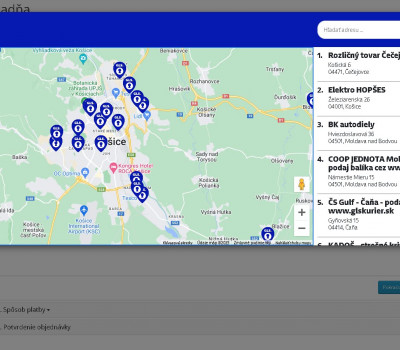
The pickup point selection is displayed in a clean pop-up window where customers can choose the nearest or most convenient location using a map or text search. The selected pickup point is automatically saved with the order and is visible in the OpenCart administration.
Main module benefits
- pickup point selection directly during checkout
- display of Packeta pickup points on a map or in a list
- seamless integration into the OpenCart checkout flow
- improved customer convenience and flexibility
- reduced errors in delivery information
- easy configuration in the OpenCart administration
How does the module work in practice?
After installation, a new Packeta shipping method becomes available in your OpenCart store. During checkout, customers select Packeta as the shipping option and then choose a specific pickup point. This information is saved with the order, giving store administrators clear visibility of the selected delivery location.
The module is suitable for e-shops that want to offer a modern and customer-preferred delivery method without complex integration or additional manual steps.
Compatibility
The module is designed for OpenCart 2.x. To ensure proper functionality, Packeta shipping services must be configured in the store administration.
If you need custom modifications, additional features, or assistance with setup, please contact us at support@opencart-solutions.com.
Module Installation Instructions
Before starting the installation of the module in OpenCart, we strongly recommend creating a backup of all store files and the database.
- Download the module file for the required OpenCart version from our website (if the archive contains installation instructions, please follow them).
- In the OpenCart administration panel, navigate to Extensions / Installer and click the Upload button.
- Select the downloaded file and wait until the module is fully installed. After successful installation, the message “Application installed successfully” will be displayed.
- Go to the Extension Modifications (Application Manager) and click the Refresh or Update button to rebuild modifications.
- Then open User Groups and assign permissions to view and manage the module for the administrator or selected users by clicking Select All.
After completing these steps, the module will be successfully installed and ready to use. You can now proceed with its configuration.